


The Statiofy Bot is the shopping assistant in the chat of Statiofy Pay, the official Statiofy app. Ask for any school supply, see photos and prices, build your cart and pay with MTN or Airtel Mobile Money without leaving the chat. The bot answers day and night, and a person from the Statiofy team is one tap away.
What you can do in the chat
- Find items by name with photos, prices and options (size, colour), including your school's list and ready school packs.
- Build a cart in the chat and pay with Mobile Money. Your receipt arrives in the chat.
- Pay part now: reserve your order with at least 40% and pay the balance before delivery.
- Choose pickup, home delivery, or Find at School for boarding students.
- Ask about an order, or talk to a person from the Statiofy team.
How to order in the chat
- Open the chat. In the Statiofy Pay app, tap the chat button (or open pay.statiofy.com/?type=orders&chat=1).
- Ask for what you need. Type an item or a command. The bot shows matching items with photos, prices and options like size or colour.
- Build your cart. Tap Add, or type /add. The cart is one card in the chat that updates as you go.
- Choose how you get it. Pickup at the shop, home delivery, or Find at School for your child.
- Pay with Mobile Money. Tap Pay now (or Pay part for a 40% deposit) and approve the prompt on your phone. The receipt arrives in the chat.
Chat commands
/price <item> | Prices and photos of matching items, e.g. /price ruled ream |
📷 List photo | Take or upload a photo of the school list or admission letter. The bot reads it and fills your requirements list for you to check |
/list | Opens a requirements form to type your whole school list in one go |
/add <qty> <item> | Adds to your cart, e.g. /add 2 rulers |
/remove <item> | Takes an item out of your cart |
/cart | Shows your cart with the total and the Pay now button |
/clear | Empties your cart |
You don't need the commands: you can also just type what you need in plain words.
Screenshots of the chat
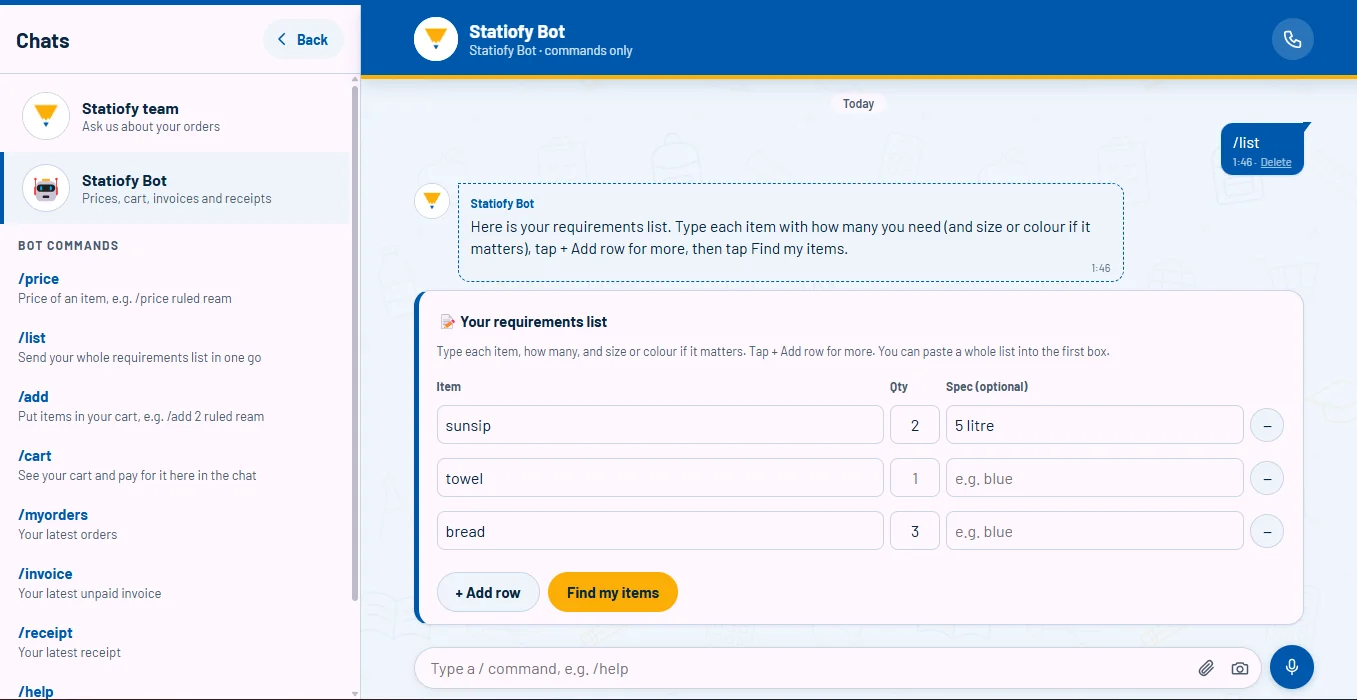
Send your whole school list to the Statiofy Bot
Type /list in the Statiofy chat to get a requirements form. Enter each item, how many and the size or colour, then tap Find my items.
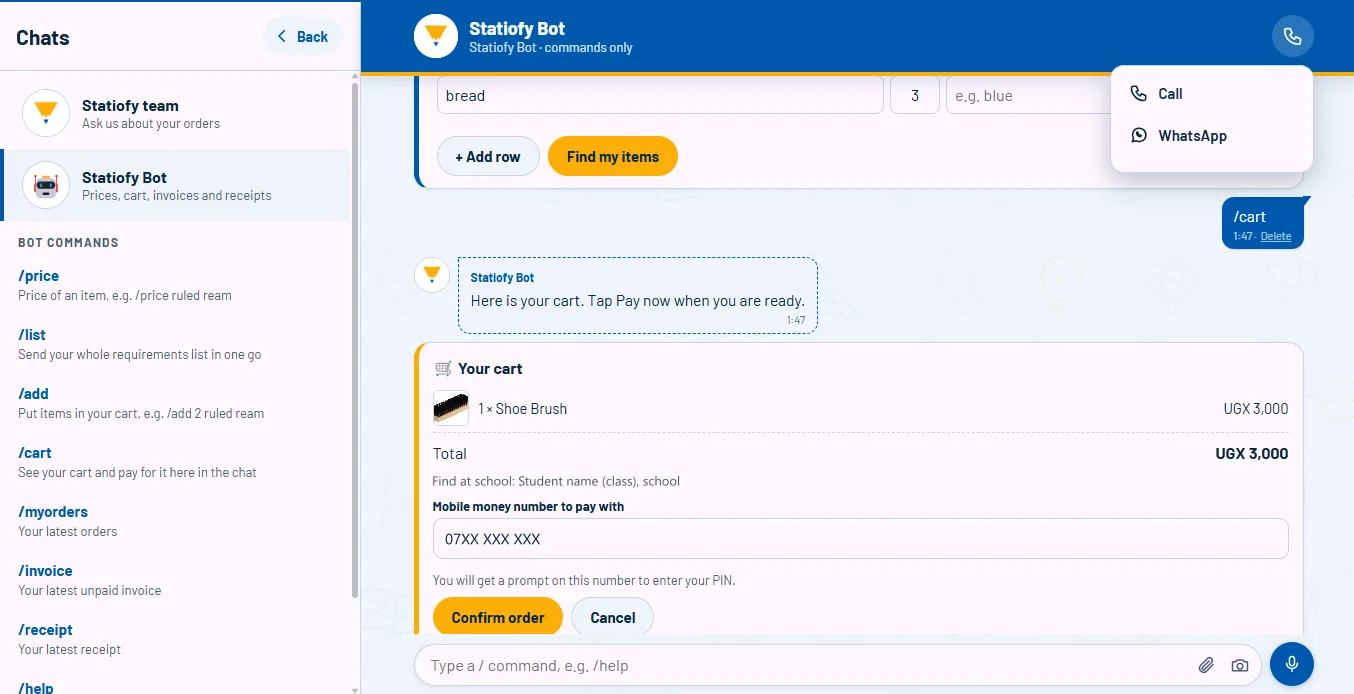
Pay for your cart inside the chat
The Statiofy Bot shows your cart with photos and the total. Confirm your Mobile Money number and approve the prompt on your phone.
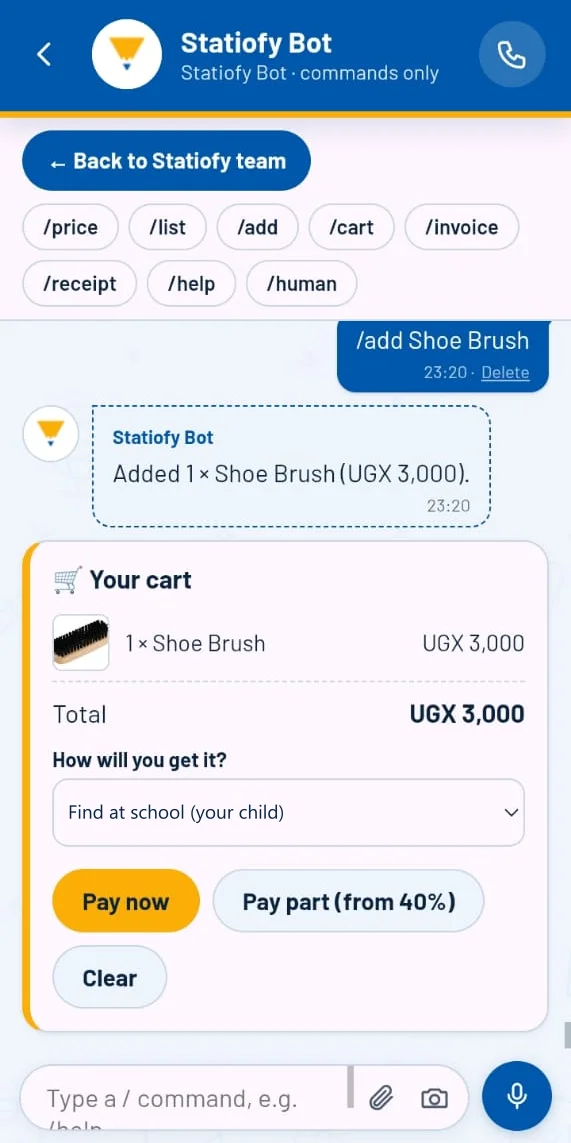
Statiofy Bot on a phone: add items with /add
Type /add and an item. The bot adds it to your cart, then choose how you get it and tap Pay now or Pay part (from 40%).
See more Statiofy Pay app screenshots
Questions about the chat
Does Statiofy have a chat bot?
Yes. The Statiofy Bot lives in the chat of the Statiofy Pay app (pay.statiofy.com). It answers day and night: it finds school supplies with photos and prices, builds your cart and lets you pay with Mobile Money without leaving the chat.
How do I order school supplies in the Statiofy chat?
Open the chat in the Statiofy Pay app, then type what you need, for example /add 2 ruled ream or /price mathematical set. The bot shows matching items with photos; tap Add on the one you want. Type /cart to see your cart, then tap Pay now.
Can I pay inside the chat?
Yes. Tap Pay now on the cart card, confirm the Mobile Money number, and approve the prompt on your phone with your PIN. Your receipt appears in the chat. You can also tap Pay part to pay at least 40% now and the balance before delivery.
Can I talk to a real person?
Yes. A person from the Statiofy team is one tap away in the same chat, and you can call or message the team on WhatsApp from there.
Can the bot deliver to my child at school?
Yes. Choose Find at School on the cart card and pick your child; the order is handed to them at school. You can also choose pickup at the shop or home delivery.
Is the chat safe?
The chat runs inside the Statiofy Pay app over a secure connection. The bot never asks for your Mobile Money PIN or your password in a chat message; you approve payments on your own phone. You can turn on a password check for chat payments in Account security.